How can we help?
Quick answers about credits, purchases, your data and getting great AI results. Still stuck? Contact us.
Draft – review before publishing. Add your real support email in place of [PLACEHOLDER: support email] and remove this box.
Getting started
What can I do with AI House Design?
Redesign a room from a photo with 15 AI tools and 20 styles, ask the AI Architecture Assistant for ideas, draw a floor plan in 2D and walk through it in 3D, turn a floor plan into a 3D picture, estimate building costs, and learn how a house is built in the Construction Academy.
Do I need an account?
No. There is no sign-up and no login. Everything you make is saved on your phone.
Is there an iPhone or iPad version?
It's coming soon to the App Store. Right now AI House Design is available for Android on Google Play.
Do the AI tools need the internet?
Yes. AI designs and the assistant run on our server, so you need a connection. The 2D/3D planner, your projects and the Academy work on your phone.
Credits & purchases
How do credits work?
Every new install gets 20 free credits. Each AI action uses credits:
- Room design (any AI tool): 10 credits
- Floor Plan to 3D and AI Render: 15 credits
- AI assistant message: 2 credits (or 5 with a photo)
If a design fails, your credits are returned automatically. You can get more credits with a credit pack or a Pro plan.
Is there a daily limit?
Yes. To keep the service fast and fair for everyone, each phone can make up to 40 AI images and send up to 200 assistant messages per day. The limit resets every day at midnight UTC. If you reach it, please try again the next day.
What does Pro include?
Pro (weekly, yearly or lifetime) includes a bundle of AI credits and unlocks:
- All furniture, materials, roofs and roof accessories in the planner
- All 20 ready-made home templates
- Inspirations and every Construction Academy stage (the first 3 are free)
- PDF plan, Blueprint PDF and HD image exports
- No ads, and no watermark on walk-mode photos
How do I restore my purchases?
Open the Pro screen in the app and tap Restore. Make sure you are signed in to the same Google account (or Apple ID on iPhone) that you used to buy.
Pro subscriptions and lifetime Pro can be restored on a new phone or after reinstalling. Credit packs can't be restored, because credits are stored on your phone and there is no account.
How do I cancel my subscription?
Uninstalling the app does not cancel your subscription. Cancel it in your store account:
- Android: open the Google Play Store app › tap your profile picture › Payments & subscriptions › Subscriptions › AI House Design › Cancel subscription.
- iPhone / iPad: open Settings › your name › Subscriptions › AI House Design › Cancel Subscription.
Cancel at least 24 hours before the renewal date. You keep Pro until the end of the period you paid for.
How do I ask for a refund?
Payments go through the store, so refunds follow the store's rules:
- Google Play: see Google Play refunds.
- Apple: go to reportaproblem.apple.com.
If something went wrong with a purchase, contact us and tell us the order number from your receipt.
Getting great AI results
How do I take a good room photo?
- Bright: open the curtains and turn on the lights.
- Wide: stand in a corner or doorway and hold the phone level so the walls, floor and windows are in view.
- Steady: hold still so the photo is sharp.
- Tidy: move small loose items, or use the Room Declutter tool first.

✓ Bright 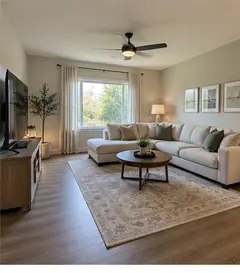
✓ Wide view 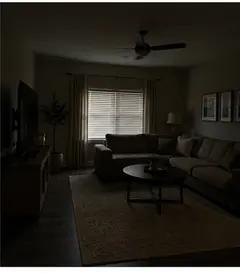
✕ Too dark 
✕ Blurry 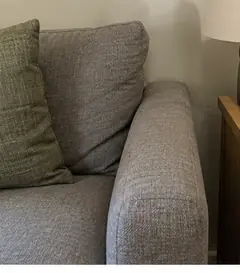
✕ Too close 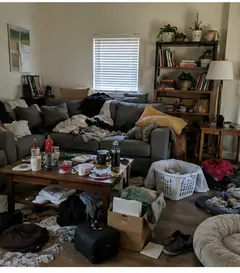
✕ Cluttered
The result doesn't look like my room. What can I do?
- Pick the right room type and a clear style.
- To keep your layout and only change the look, try Room Restyle. To change one thing, try New Flooring, New Walls or Replace & Add Furniture.
- Tap Variations to get another version with the same settings.
- Use Edit with AI to describe a small change, like “make the sofa green”.
AI creates a new picture each time, so small details can change. Results are ideas, not exact plans.
My design failed or is taking too long
- Check your internet connection and try again. Failed designs return your credits.
- You may have reached the daily limit (40 images / 200 messages). Try again tomorrow.
- Make sure you have the latest version of the app from Google Play.
Still not working? Contact us with your phone model and app version.
Are the AI designs real products or building plans?
No. AI designs, 3D pictures, cost estimates and lessons are ideas and general guides. Furniture shown may not exist. Always check with a qualified architect, engineer or builder before you build or renovate.
Your data
Where are my designs saved?
On your phone. AI designs are in the AI Album, and floor plans and 3D designs are in Projects. When you save or export, files go to your phone's Downloads or Photos.
Do you keep my photos?
No. Your photo is made smaller and its location data is removed on your phone. It is then sent to our server to make your design and is not stored there. Read the Privacy Policy for details.
How do I delete my data?
There are no accounts, so your data is on your phone:
- Delete single items: remove designs in the AI Album and projects in Projects.
- Delete everything (Android): Settings › Apps › AI House Design › Storage › Clear storage, or uninstall the app.
- Delete everything (iPhone/iPad): delete the app.
This also removes your credits and saved designs, so save anything you want to keep first. On our server, daily usage counts are deleted automatically within about 2 days. If you have a privacy question, contact us.